PRODUCTS
- The Complete Solution
- Product Edition
- Pricing
- Features Overview
- Screen Shots
- Demo Videos
- Hardware Options
- The Paperless Concept
- Trade Shows
- Data Migration
- Case Study
- Why choose Visual Optical RMS?
- 中文
OTHERS
Multi-branch Module
What is it? |
||
Multi-branch module is for linking up of multiple branches, where information is synchronized automatically in a seamless way. Information such as inventory records, customer records and user access profiles are updated to each branch whenever changes is made from any other branches or headquarters office. Other than synchronization of data, inter-branch stock transfer and receiving can also be performed with the multi-branch module working like a middleman. A Stock transfer slip will be generated each time a transfer is initiated and this works like an internal delivery order to management of goods receiving. Besides all the functionalities, the multi-branch module also comes with a web-based user interface where users can login to check their sales reports, inventory movement, staff activities and many other useful reports. |
||
Features Overview |
||
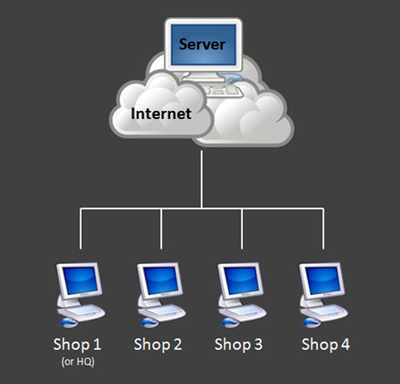
With the Multi-branch module, you can synchronize and maintain one set of data across all outlets, such as (customer records), (inventory) and (user access). In this way, double entry of data is eliminated in different outlets. Other benefits of the multi-branch module includes stock transfer management and a powerful online web-based reporting. |
||
 |
||
Outlets are linked to server through internet |
||
 |
||
Inter-Branch Stock Transfer |
||
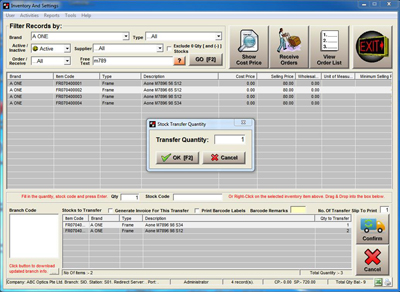
| Transfer stock internally between branches and acknowledge/receive transfers simply by scanning transfer slips. No more double entry of stock from receiving branch! | ||
 |
||
Stock Transfer Function |
||
 |
||
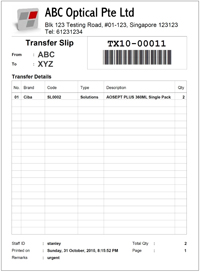
| Each transfer is accompanied by a “Transfer Slip”, which works like an internal Delivery Order. | ||
Stock Transfer Slip |
||
|
||
Online web-based reporting |
||
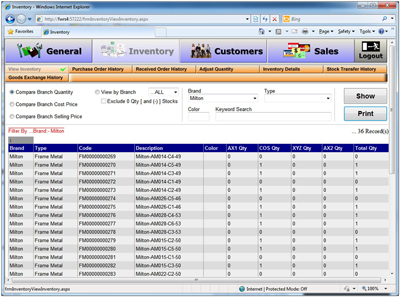
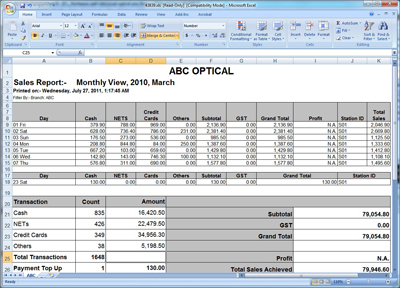
| Sales, inventory and other reports can be access anytime by logging in to the web-based module hosted at the server. All reports can be downloaded and saved in excel format. | ||
 |
||
Web-based interface, Compare branch quantity |
||
 |
||
 |
||
Excel Reports |
||
|
||